Have you ever filed your Income Tax Return and then received a notice saying your income does not match what the department has on record? Or wondered how the Income Tax Department even knows about your FD interest, your mutual fund redemptions, or that property you sold two years ago?
The answer is AIS — Annual Information Statement. And if you are not checking it before filing your ITR every year, you are filing blind.
AIS is one of the most important documents introduced by the Income Tax Department in recent years, yet most salaried individuals have never opened it even once. In this article, I will explain exactly what AIS is, what it shows, how to download it, and why reviewing it before filing your ITR is non-negotiable.
- What is AIS in Income Tax?
- Are AIS and Form 26AS the Same?
- Which Transactions Are Reported in AIS?
- How to Download AIS in Income Tax – Step by Step
- What is TIS – Taxpayer Information Summary?
- Is AIS Mandatory for Income Tax Returns?
- How to Give Feedback on Incorrect AIS Entries
- Common AIS Mistakes That Lead to Income Tax Notices
- Frequently Asked Questions on AIS in Income Tax
- Conclusion
What is AIS in Income Tax?
AIS — Annual Information Statement — is a comprehensive summary of a taxpayer’s financial transactions and income for a financial year. It includes details such as TDS deducted, interest earned on savings and fixed deposits, purchase and sale of shares or mutual funds, high-value transactions like property or vehicle purchases, and more.
In simple words — AIS is a record of everything the Income Tax Department already knows about your money. It collects this information from banks, employers, mutual fund registrars, property registrars, brokers, and dozens of other sources — all linked to your PAN.
The objective behind introducing AIS is to provide all pertinent financial information in one place, giving taxpayers a holistic view of their financial status, and to encourage voluntary compliance with tax laws by making comprehensive financial information readily available.
Think of AIS as the Income Tax Department’s version of your financial report card — compiled from multiple sources, sitting on their server, and waiting for you to match it with what you declare in your ITR.
How to File ITR (Income Tax Return) on Salary Video
Watch more Videos on YouTube Channel
Are AIS and Form 26AS the Same?
No — and this is one of the most common points of confusion for taxpayers.
Form 26AS displays only TDS and TCS-related data of the taxpayer. AIS, on the other hand, provides much broader information — including interest income, dividend income, securities transactions, mutual fund transactions, foreign remittance details, and more.
Here is how the two compare – AIS vs Form 26AS:
| Form 26AS | AIS | |
|---|---|---|
| TDS deducted | Yes | Yes |
| TCS collected | Yes | Yes |
| Savings / FD Interest | No | Yes |
| Dividend income | No | Yes |
| Mutual fund transactions | No | Yes |
| Share market transactions | No | Yes |
| Property purchase/sale | No | Yes |
| Foreign remittances | No | Yes |
| High-value cash deposits | No | Yes |
| Feedback option | No | Yes |
Form 26AS has been the primary tax document for years. But it only showed you taxes deducted — not all income earned. AIS was introduced to fill that gap and give taxpayers — and the department — a complete picture.
Form 26AS is the legally operative document for claiming TDS and advance tax credits. AIS provides broader income visibility but does not govern tax credits. If AIS and Form 26AS show different TDS amounts, the credit claimed in the ITR is validated against Form 26AS during CPC processing.
So to summarize: use Form 26AS to verify your TDS credits, and use AIS to verify all your income — both work together and neither alone is sufficient.
ALSO READ: 9 Things to know before Filing ITR (Income Tax Return)
Which Transactions Are Reported in AIS?
AIS is divided into categories covering TDS/TCS, interest, dividends, securities and mutual fund transactions, property and vehicle purchases, foreign remittances, and more. It provides both the Reported Value from reporting entities and the Modified Value after taxpayer feedback.
Here is a detailed breakdown of what appears in your AIS:
TDS and TCS Information:
- TDS deducted on your salary by employer
- TDS deducted by banks on FD interest
- TDS on rent received
- TCS collected on vehicle purchase, foreign remittances, etc.
Interest Income:
- Interest on savings bank account — reported by your bank
- Interest on fixed deposits — reported by your bank
- Interest on recurring deposits
- Interest on bonds
Dividend Income:
- Dividends from mutual funds
Securities and Capital Market Transactions:
- Mutual fund purchases and redemptions — reported by BSE, NSE and CAMS/KFintech
- Purchase and sale of bonds and debentures
Property Transactions:
- Purchase of immovable property above Rs. 30 Lakh — reported by property registrar
- Sale of property — reported by property registrar and buyer (through Form 26QB)
Other High-Value Transactions (SFT — Statement of Financial Transactions):
- Cash deposits above Rs. 10 Lakh in savings accounts in a year
- Credit card payments above Rs. 1 Lakh (cash) or Rs. 10 Lakh (non-cash) per year
- Foreign remittances above Rs. 7 Lakh under LRS
- Purchase of foreign currency above Rs. 10 Lakh
- Time deposits (FDs) above Rs. 10 Lakh in a year
Other Income:
- Salary details from employer
- Rent received — reported by tenant if they deduct TDS
- Business receipts in GST — your GSTR-3B turnover may appear here
- Winnings from lottery or online gaming
This list makes one thing clear — the Income Tax Department has visibility into virtually every significant financial transaction you make. Anything they know that you do not declare in your ITR is a mismatch waiting to become a notice.
ALSO READ: What is Form 16 in Income Tax Return
How to Download AIS in Income Tax – Step by Step
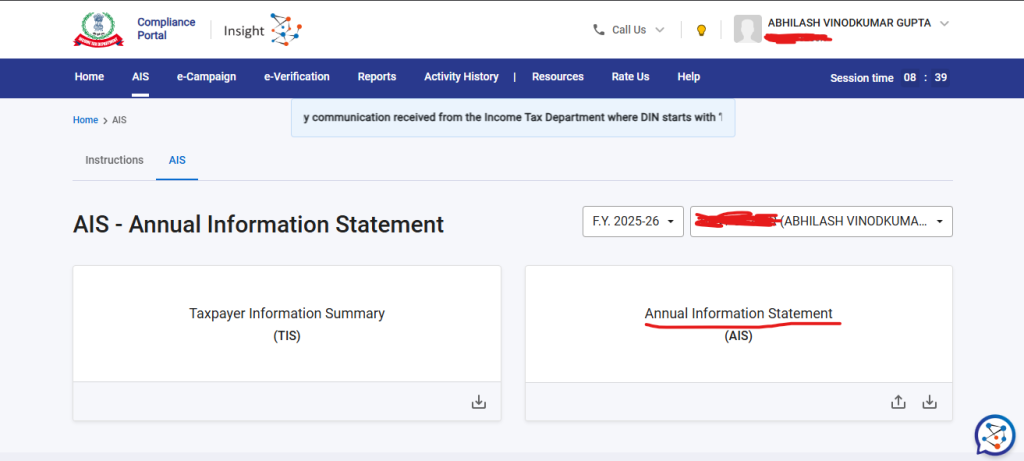
You can access the Annual Information Statement by following these steps: Log in to incometax.gov.in using your PAN or Aadhaar and password. After login, click on the Annual Information Statement (AIS) menu on the dashboard. Click on Proceed, which will redirect you to the AIS portal. Click on the AIS tile to view your Annual Information Statement.
Here are the exact steps:
- Step 1 — Go to incometax.gov.in and log in with your PAN and password
- Step 3 — Click Proceed — this opens the AIS portal in a new tab
- Step 4 — Select the Financial Year for which you want to check (e.g., FY 2025-26)
- Step 5 — Click on the AIS tile to view the full statement
- Step 6 — To download, click the download icon and choose PDF or JSON format
The AIS PDF is password-protected. The password format is your PAN in lowercase followed by your date of birth in DDMMYYYY format. For example, if your PAN is AAAAA0000A and your date of birth is January 1, 1990, the password is aaaaa0000a01011990.
You can also download category-wise transactions in CSV format — useful if you want to check just your mutual fund transactions or just your interest income without going through the entire document.
What is TIS – Taxpayer Information Summary?
When you open the AIS portal, you will see two tabs — AIS and TIS. Many people do not know what TIS is.
TIS is an aggregated version of AIS designed to pre-fill your ITR. It shows the category-wise summary of your income with the values processed after your feedback, making it easier to use directly while filing your return.
Think of it this way — AIS is the detailed version showing every individual transaction. TIS is the summarised version that tells you: total salary income, total interest income, total capital gains, and so on — ready to be carried into your ITR.
When you file ITR on the portal, the pre-filled return picks up values from TIS. This is why reviewing TIS before filing is critical — if any number looks wrong in TIS, it means the underlying AIS data has an error that needs your feedback.
Is AIS Mandatory for Income Tax Returns?
AIS serves as a helpful reference statement for filing an income tax return but it is not an absolute or conclusive document. Despite information shown in the AIS, taxpayers are still required to independently declare all sources of income.
So AIS is not mandatory in the sense that you are not legally required to download and submit it. But reviewing it before filing is strongly recommended — because:
- The Income Tax Department uses AIS data to verify what you have declared in your ITR
- If there is a mismatch — even an innocent one like FD interest you forgot to declare — it can trigger an automated notice
- Most income tax notices do not arise because taxpayers deliberately conceal income. They arise because what the taxpayer filed did not match what the system already had on record. Reviewing AIS before filing closes that gap before it becomes a problem.
CBDT has also asked taxpayers to download and review AIS before filing. Treating it as a mandatory step — even if technically optional — protects you from unnecessary notices and refund delays.
How to Give Feedback on Incorrect AIS Entries
What if your AIS shows an FD interest amount that is wrong? Or a mutual fund redemption that belongs to someone else with the same name? You can submit feedback directly on the AIS portal.
Upon successful submission of feedback on AIS information, the feedback will be displayed with the information and the modified value will also be visible along with the reported value. Email and SMS confirmations for submission of feedback will be sent.
Feedback options available:
- Information is correct
- Income is not taxable
- Income is already included in another entry
- Information relates to another year
- Information is duplicate
- Information is denied — it does not belong to me
After submitting feedback, the Modified Value in AIS and the Derived Value in TIS both update to reflect your correction. This modified value is what gets pre-filled in your ITR.
Important: Submitting feedback in AIS does not automatically fix the actual data at the source. If a bank has reported a wrong TDS amount, you need to contact the bank to file a corrected TDS statement — AIS feedback alone is not sufficient for TDS credit claims.
ALSO READ: 8 Best Investment Options for Monthly Income
Common AIS Mistakes That Lead to Income Tax Notices
- Not declaring FD interest — banks report every rupee of FD interest to AIS. If you do not declare it in your ITR, a mismatch notice is almost certain
- Missing mutual fund redemptions — even small redemptions appear in AIS under securities transactions. Capital gains from all redemptions must be declared
- Ignoring dividend income — dividends from stocks and mutual funds are now taxable and fully visible in AIS
- Property sale not declared — the moment a property is registered, it appears in the buyer’s and seller’s AIS. Forgetting to declare capital gains on property sale is one of the most common sources of high-value notices
- For business income filers, GST turnover declared in GSTR-3B feeds into AIS. If your ITR business turnover and your GSTR-3B totals are significantly different, that discrepancy will be visible to the department
Frequently Asked Questions on AIS in Income Tax
How do I get AIS in income tax?
Log in to incometax.gov.in, click on Services, select Annual Information Statement (AIS), click Proceed and then click on the AIS tile. You can view it online or download it in PDF or JSON format. The PDF password is your PAN in lowercase followed by your date of birth in DDMMYYYY format.
Is AIS mandatory for filing Income Tax Return?
AIS is not mandatory to submit, but reviewing it before filing your ITR is strongly recommended. The Income Tax Department uses AIS data to verify your ITR, and any mismatch between your return and AIS can trigger automated notices.
Are AIS and Form 26AS the same?
No. Form 26AS shows only TDS and TCS information. AIS is much broader — it includes interest income, dividends, capital gains, property transactions, mutual fund activity, foreign remittances, and more. Form 26AS remains the authoritative document for TDS credit claims.
Which transactions are reported in AIS?
AIS includes salary, TDS/TCS, savings and FD interest, dividends, share market and mutual fund transactions, property purchases and sales, foreign remittances, large cash deposits, credit card payments above threshold, and GST turnover for businesses — all linked to your PAN.
What if my AIS shows incorrect information?
You can submit feedback directly on the AIS portal by selecting the relevant transaction and choosing the appropriate feedback option. The modified value updates in TIS and pre-fills your ITR accordingly.
Conclusion
AIS is the Income Tax Department’s way of saying — we already know about your financial transactions, now make sure your ITR matches. The good news is that AIS is available to you too, completely free, on the income tax portal. Spend 15 minutes reviewing your AIS before you file your ITR this year. It could save you from months of dealing with notices, queries and revised returns later.
Save Home Loan Interest Amount!
Use Home Loan Excel Calculator that will help you to Save Interest Amount on Home Loan EMI.
Click below button to download Home Loan EMI and Prepayment Calculator in Excel:
Watch how Home Loan Calculator in Excel Works
Income Tax Calculator App – FinCalC
For Income Tax Calculation on your mobile device, you can Download my Android App “FinCalC” which I have developed for you to make your income tax calculation easy.
What you can do with this mobile App?
- Calculate Income Tax for FY 2025-26 and previous FY 2024-25
- Enter estimated Investments to check income tax with Old and New Tax Regime
- Save income tax details and track regularly
- Know how much to invest more to save income tax
- More calculators including PPF, SIP returns, Savings account interest and lot more
Use Popular Calculators:
- Income Tax Calculator
- Home Loan EMI Calculator
- SIP Calculator
- PPF Calculator
- HRA Calculator
- Step up SIP Calculator
- Savings Account Interest Calculator
- Lump sum Calculator
- FD Calculator
- RD Calculator
- Car Loan EMI Calculator
- Bike Loan EMI Calculator
- Sukanya Samriddhi Calculator
- Provident Fund Calculator
- Senior Citizen Savings Calculator
- NSC Calculator
- Monthly Income Scheme Calculator
- Mahila Samman Savings Calculator
- Systematic Withdrawal Calculator
- CAGR Calculator
I’d love to hear from you if you have any queries about Personal Finance and Money Management.
JOIN Telegram Group and stay updated with latest Personal Finance News and Topics.
Download our Free Android App – FinCalC to Calculate Income Tax and Interest on various small Saving Schemes in India including PPF, NSC, SIP and lot more.
Follow the Blog and Subscribe to YouTube Channel to stay updated about Personal Finance and Money Management topics.
Disclaimer: Mutual Fund investments are subject to market risks, read all scheme related documents carefully. Registration granted by AMFI, membership of SIRO (if applicable), and certification from NISM in no way guarantee performance of the intermediary or provide any assurance of returns to investors.
Distributor Details: Name: Abhilash Gupta | AMFI Registered Mutual Fund Distributor | ARN: 367014