
Most people who want to start a SIP in 2026 face the same problem — they know they should invest, they have an amount in mind, but they do not know where to start or which platform to trust. And then they spend weeks researching, overthinking, and ultimately doing nothing.
If that sounds familiar, this guide is for you. I am going to walk you through the simplest, fastest way to start your SIP online in 2026 — through AssetPlus, the same platform I use for my mutual fund distribution practice as an AMFI-registered Mutual Fund Distributor.
Before we get into the steps, let me quickly cover the basics for anyone new to SIP.
Connect with me on WhatsApp if you have any queries:
What is SIP and Why Should You Start in 2026?
SIP — Systematic Investment Plan — is a method of investing a fixed amount every month in a mutual fund of your choice. You do not need a large lump sum amount. You start with as little as Rs. 500 per month, and the money is automatically debited from your bank account on a date you choose.
I have explained what is SIP, its features and benefits with returns calculation in detail on this blog — but the short version is:
- SIP uses rupee-cost averaging — you buy more units when markets are low and fewer when markets are high, which reduces your average cost over time
- You benefit from compounding — the longer you stay invested, the faster your money grows. I have explained how compounding works in mutual funds with real examples here
- SIP builds investing discipline — money goes out automatically, removing the temptation to spend it
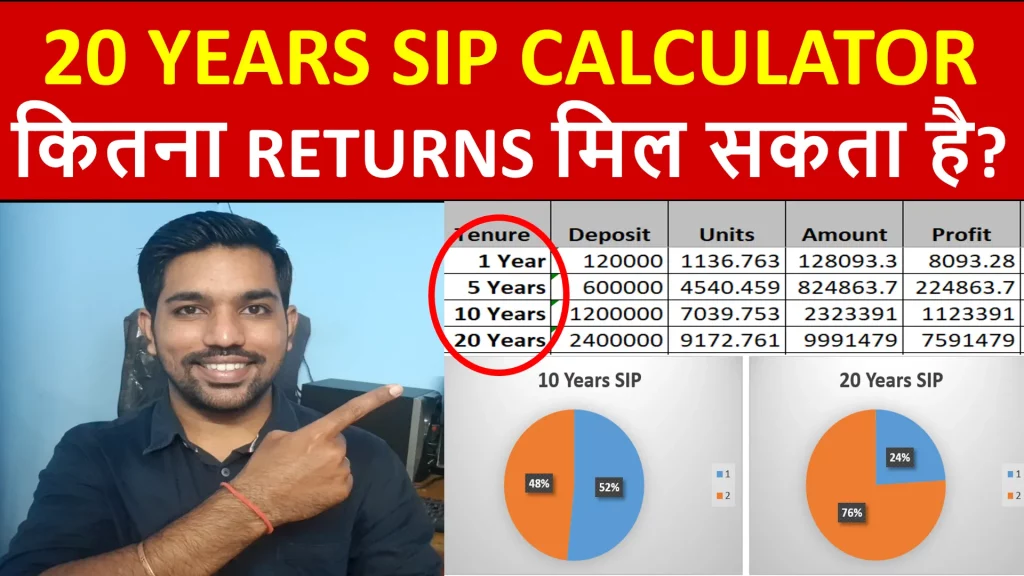
If you want to understand exactly how much your Rs. 5,000 or Rs. 10,000 SIP can grow over 10, 20 or 30 years, use the SIP calculator on this blog to calculate your exact returns before you invest.
What is SIP and How to Start SIP [VIDEO]

Watch more Videos on YouTube Channel
How to Start SIP Online – What You Need Before You Begin
Before starting your SIP online on AssetPlus or any platform, keep these ready:
- PAN Card — mandatory for mutual fund investments
- Aadhaar Card — for KYC verification
- Bank account details — savings account with net banking or UPI enabled
- A selfie or photo — for video KYC or in-person KYC verification
- Mobile number linked to Aadhaar — for OTP-based verification
If you have never invested in a mutual fund before, you will also need to complete KYC (Know Your Customer) — a one-time process. On AssetPlus, this is done online through Aadhaar-based eKYC in under 5 minutes.
Why AssetPlus? – The Platform I Use for My MFD Practice
AssetPlus is a technology platform designed for AMFI-registered Mutual Fund Distributors and their clients. It allows you to invest across all mutual fund houses in India — all through one single login.
Here is why I recommend it for my clients:
- All fund houses in one place — you can invest in any AMC across India without opening separate accounts with each
- Direct goal-based investing — you link each SIP to a specific goal (retirement, child education, home) so your investments stay organized
- Clean and simple interface — designed for salaried investors who want simplicity, not complexity
- Transparent tracking — your portfolio, returns, and fund performance all visible in one dashboard
- Portfolio rebalancing support — when markets shift or your goals change, portfolio review is easy
When you invest through AssetPlus via my ARN number, I act as your distributor — helping you select the right fund, tracking your portfolio, and ensuring your investment stays on course toward your goal. This comes at no additional cost to you as the investor.
How to Start SIP Online via AssetPlus – Step by Step
Step 1 – Register and Complete KYC
- Visit assetplus.in or download the AssetPlus app on your phone
- Click Register and enter your mobile number
- Enter the OTP received on your registered mobile number
- Enter your PAN Number — the system automatically checks your KYC status
- If your KYC is not done, you will be prompted to complete Aadhaar-based eKYC — enter your Aadhaar number, approve the OTP, and complete a quick video or selfie-based verification
- Once KYC is verified, your account is ready for investment
Step 2 – Enter Your Goal and Investment Details
AssetPlus follows a goal-based investment approach. After login:
- Click Start Investing or Create New Goal
- Select your goal — Retirement, Child Education, Wealth Creation, Emergency Fund, or a custom goal
- Enter your target amount and target date
- The platform calculates the monthly SIP amount you need to reach your goal
This step is optional — you can also skip goal selection and directly choose a fund if you already know what you want to invest in.
Step 3 – Choose Your Mutual Fund
Once your goal is set, the platform suggests funds based on your goal horizon and risk profile. You can accept the suggested fund or browse and select your own.
For beginners, here is a simple starting framework:
- Goal horizon above 7 years and comfortable with equity risk → Flexi-cap fund or Large and Midcap Fund
- Goal horizon 3 to 7 years → Hybrid or Balanced Advantage Fund
- Goal horizon under 3 years → Short-term debt fund or liquid fund
You cna connect with me on WhatsApp for any queries. Link to connect is the the top of this article.
Step 4 – Set SIP Amount, Date and Frequency
- Enter your monthly SIP amount — minimum Rs. 500 for most funds
- Choose your SIP date — the date on which money will be debited from your bank every month. I recommend choosing a date 2-3 days after your salary credit date
- Choose frequency — monthly is the most common and recommended
- Select your SIP tenure — you can set a fixed number of months or choose perpetual (ongoing until you stop)
Step 5 – Set Up Auto-Debit (Mandate)
For automatic monthly deductions, you need to set up an e-mandate:
- Select your bank from the list
- Choose Net Banking mandate or NACH mandate (debit from bank account directly)
- For Net Banking mandate — log in to your bank’s net banking when prompted and approve the mandate. This is instant
- For NACH mandate — fill in your bank details and sign digitally. NACH mandates typically take 10 to 30 working days to activate
Once the mandate is set up, your SIP runs automatically every month on the chosen date. No action needed from your side.
Step 6 – Make the First Payment
After mandate setup, complete your first SIP payment:
- Choose payment method — UPI, Net Banking, or NACH
- Enter UPI ID or select your bank for net banking payment
- Complete the payment — you will receive a confirmation with your folio number and units allotted
Your SIP is now active. From the next month onwards, money will be debited automatically.
Which SIP is Better in 2026?
This depends entirely on your goal and risk appetite — not the platform or the fund name. Here is a simple framework:
| Goal | Recommended Fund Type | Expected Return (not guaranteed) |
|---|---|---|
| Wealth creation, 10+ years | Flexi-cap or Mid-cap equity fund | 12%–15% CAGR |
| Retirement corpus, 20+ years | Large and Midcap fund or Multi-cap | 11%–14% CAGR |
| Child education, 7–10 years | Hybrid or Large cap fund | 10%–12% CAGR |
| Short term goal, 2–3 years | Short duration debt fund | 6%–8% CAGR |
| Tax saving (80C benefit) | ELSS fund — 3 year lock-in | 12%–15% CAGR |
For ELSS funds that give you 80C tax benefit alongside market-linked returns, read the ELSS mutual funds explained article here. And to understand SIP vs Lumpsum — which is better, I have a detailed comparison with examples on this blog.
How Much is Rs. 50,000 Monthly SIP for 5 Years?
At 12% annual expected return:
| Amount | |
|---|---|
| Monthly SIP | Rs. 50,000 |
| Total Invested in 5 years | Rs. 30,00,000 |
| Corpus at 12% p.a. | Rs. 40.97 Lakh |
| Wealth Gain | Rs. 10.97 Lakh |
At 15% annual return:
- Corpus = Rs. 44.37 Lakh
- Wealth Gain = Rs. 14.37 Lakh
5 years is a relatively short tenure for equity SIP — the compounding effect is visible but limited compared to 10 or 20 year horizons. If your goal is 5 years away, consider a hybrid or balanced advantage fund rather than a pure equity fund to reduce volatility risk near redemption.
I have explained SIP vs Step-Up SIP — which is better in detail — if you can increase your SIP amount by 10% every year, your corpus grows dramatically faster than a flat Rs. 50,000 per month.
How to Start SIP and Where to Start – Things to Remember
- Start today, not next month — the biggest cost in investing is the delay. Read about the 6 benefits of investing early to understand what even 2-3 years of delay costs you
- Pick 2-3 funds, not 10 — more funds do not mean more diversification. Read about the ideal portfolio of mutual funds for a framework
- Link each SIP to a goal — SIPs without goals get redeemed at the wrong time
- Do not stop during market falls — the units you buy during a 20-30% market correction are the ones that generate maximum returns in the recovery.
- Increase SIP every year — as your salary grows, increase your SIP by at least 10% annually
Frequently Asked Questions on Starting SIP in 2026
Which SIP is better in 2026? There is no single “best SIP” — it depends on your goal and time horizon. For long-term wealth creation (10+ years), a flexi-cap or large and midcap fund SIP is a strong choice. For tax saving with 80C benefit, an ELSS SIP works. For a 3-5 year goal, a hybrid or short-duration fund is more appropriate than a pure equity fund.
How much is Rs. 50,000 monthly SIP for 5 years? At 12% annual return, a Rs. 50,000 monthly SIP for 5 years gives approximately Rs. 40.97 Lakh. Your total invested amount is Rs. 30 Lakh — the remaining Rs. 10.97 Lakh is wealth gained from compounding. At 15% return, the corpus reaches Rs. 44.37 Lakh.
How to start SIP and where to start? Decide your goal and time horizon first. Then choose a platform — AssetPlus for distributor-assisted investing. Complete KYC with your PAN and Aadhaar, select a fund matching your goal, enter your SIP amount and date, set up e-mandate for auto-debit, and make the first payment. You are now a SIP investor.
Starting a SIP is genuinely one of the simplest financial decisions you can make — and it gets simpler every year with platforms like AssetPlus. The hardest part is not the process. The hardest part is deciding to start.
Save Home Loan Interest Amount!
Use Home Loan Excel Calculator that will help you to Save Interest Amount on Home Loan EMI.
Click below button to download Home Loan EMI and Prepayment Calculator in Excel:
Watch how Home Loan Calculator in Excel Works
Income Tax Calculator App – FinCalC
For Income Tax Calculation on your mobile device, you can Download my Android App “FinCalC” which I have developed for you to make your income tax calculation easy.
What you can do with this mobile App?
- Calculate Income Tax for FY 2026-27 and previous FY 2025-26
- Enter estimated Investments to check income tax with Old and New Tax Regime
- Save income tax details and track regularly
- Know how much to invest more to save income tax
- More calculators including PPF, SIP returns, Savings account interest and lot more

Use Popular Calculators:
- Income Tax Calculator
- Home Loan EMI Calculator
- SIP Calculator
- PPF Calculator
- HRA Calculator
- Step up SIP Calculator
- Savings Account Interest Calculator
- Lump sum Calculator
- FD Calculator
- RD Calculator
- Car Loan EMI Calculator
- Bike Loan EMI Calculator
- Sukanya Samriddhi Calculator
- Provident Fund Calculator
- Senior Citizen Savings Calculator
- NSC Calculator
- Monthly Income Scheme Calculator
- Mahila Samman Savings Calculator
- Systematic Withdrawal Calculator
- CAGR Calculator
I’d love to hear from you if you have any queries about Personal Finance and Money Management.
JOIN Telegram Group and stay updated with latest Personal Finance News and Topics.
Download our Free Android App – FinCalC to Calculate Income Tax and Interest on various small Saving Schemes in India including PPF, NSC, SIP and lot more.
Follow the Blog and Subscribe to YouTube Channel to stay updated about Personal Finance and Money Management topics.
Disclaimer: Mutual Fund investments are subject to market risks, read all scheme related documents carefully. Registration granted by AMFI, membership of SIRO (if applicable), and certification from NISM in no way guarantee performance of the intermediary or provide any assurance of returns to investors.
Distributor Details: Name: Abhilash Gupta | AMFI Registered Mutual Fund Distributor | ARN: 367014